AcuGIS Backup Access
Use an AcuGIS Backup connection when AcuGIS Backup is already installed and its web interface listens on the server. AcuGIS Connect forwards a local port through SSH and opens that address in your normal browser.
AcuGIS Connect does not embed the Backup interface, and it does not log in for you. Backup jobs stay in AcuGIS Backup. This application only provides the tunnel. Installing the service, destinations, jobs, and schedules is covered in AcuGIS Backup. AcuGIS Backup does not restore data.
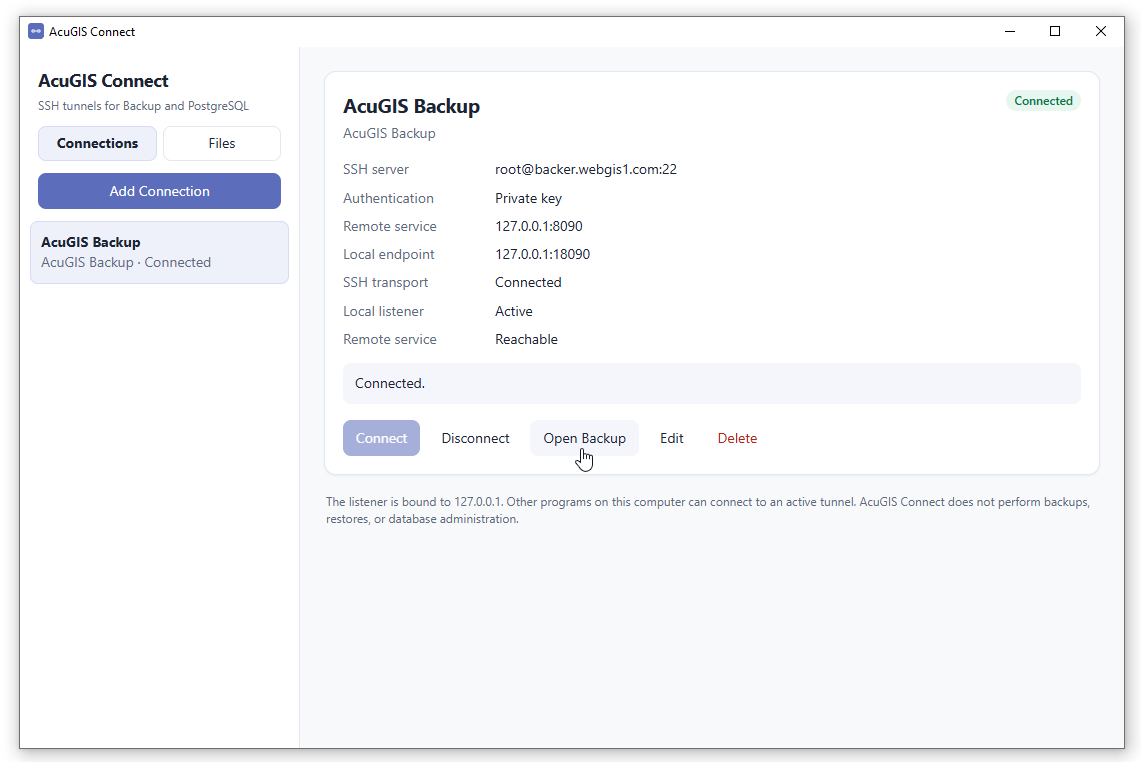
Create the connection
- Click Add Connection.
- Set Type to AcuGIS Backup.
- Enter the SSH host, SSH port, SSH username, and authentication method.
- Set the Backup address as the SSH server sees it. The form starts with:
| Setting | Value |
|---|---|
| Remote host | 127.0.0.1 |
| Remote port | 8090 |
| Local port | 18090 |
Leave the remote host at 127.0.0.1 when Backup listens on the SSH server's loopback address. Do not publish port 8090 on the server firewall for this tunnel. The browser uses the local port on your computer.
- Click Save.
One documented example is the host backer.webgis1.com, with Backup listening on 127.0.0.1:8090 on that server and the local port 18090. Use the host and ports for your own installation when they differ.
Connect and sign in
- Select the profile and click Connect.
- Approve the host key the first time. Check the key type and SHA256 fingerprint, then click Trust and Connect.
- When the remote Backup service answers, your default browser opens
http://127.0.0.1:18090, or the local port you saved. - Sign in with the existing Backup web account.
AcuGIS Connect never asks for or stores that password.
Open Backup opens the same local address again while the tunnel is connected. Closing the browser does not close the tunnel. Disconnect closes it. Quitting AcuGIS Connect closes every tunnel.
A listening local port does not by itself mean Backup is running. If SSH is connected and the listener is active, but the remote service does not answer, the status says the remote service is not reachable and the browser is not opened automatically. Open Backup remains available so you can try the page after the service starts. Only an http://127.0.0.1 address is opened for a Backup profile.
The local port can be changed. Each active connection needs its own local port.