PostGIS
 Mobile
 QGIS
QGIS MapBender
 GeoServer
 GeoNode
 GeoNetwork
 Solutions


























This post will cover adding a Layer Selector to your Leaflet maps.
Let’s start with our Leaflet GeoJSON map we made in the previous tutorial.
<!DOCTYPE html>
<html lang="en">
<head>
<base target="_top">
<meta charset="utf-8">
<meta name="viewport" content="width=device-width, initial-scale=1">
<title>Leaflet GeoJSON Example</title>
<!-- Leafletjs and CSS -->
<script src="https://unpkg.com/leaflet@1.9.4/dist/leaflet.js" integrity="sha256-20nQCchB9co0qIjJZRGuk2/Z9VM+kNiyxNV1lvTlZBo=" crossorigin=""></script>
<link rel="stylesheet" href="https://unpkg.com/leaflet@1.9.4/dist/leaflet.css" integrity="sha256-p4NxAoJBhIIN+hmNHrzRCf9tD/miZyoHS5obTRR9BMY=" crossorigin=""/>
<script src="https://code.jquery.com/jquery-3.7.1.js" integrity="sha256-eKhayi8LEQwp4NKxN+CfCh+3qOVUtJn3QNZ0TciWLP4=" crossorigin="anonymous"></script>
<!-- Inline map styling -->
<style>
html, body {
height: 100%;
margin: 0;
}
.leaflet-container {
height: 80%;
width: 80%;
max-width: 100%;
max-height: 100%;
}
</style>
</head>
<body>
<div id="map"></div>
<script>
var map = L.map('map').setView([47.7541, -107.05078], 3);
var osm = new L.tileLayer('https://{s}.tile.osm.org/{z}/{x}/{y}.png',{
attribution: '© <a href="http://osm.org/copyright">OpenStreetMap</a> contributors'}).addTo(map);
var url = 'states.json'; // GeoJSON data source. Can be file or GeoServer url.
//Loop through JSON file for features information -->
function forEachFeature(feature, layer) {
// Print all feature information
var mypopupContent = '<pre>'+JSON.stringify(feature.properties,null,' ').replace(/[\{\}"]/g,'')+'</pre>';
// above Bind to popup content
layer.bindPopup(mypopupContent);
}
// Null var that will hold layer
var myLayer = L.geoJson(null, {onEachFeature: forEachFeature});
// Add mylayer above to map
$.getJSON(url, function(data) {
myLayer.addData(data);
});
myLayer.addTo(map);
</script>
</body>
</html>
Add the code below just above the closing </script> tag
The code is commented below.
:
// Get Overlay(s)
var overlayMap = {
    "United States" :myLayer
};

// Get Basemaps
var baseMap = {
    "OpenStreetMap" :osm
};

// Add to control
L.control.layers(baseMap, overlayMap).addTo(map);
So our final code looks like below:
<!DOCTYPE html>
<html lang="en">
<head>
<base target="_top">
<meta charset="utf-8">
<meta name="viewport" content="width=device-width, initial-scale=1">
<title>Leaflet GeoJSON Example</title>
<!-- Leafletjs and CSS -->
<script src="https://unpkg.com/leaflet@1.9.4/dist/leaflet.js" integrity="sha256-20nQCchB9co0qIjJZRGuk2/Z9VM+kNiyxNV1lvTlZBo=" crossorigin=""></script>
<link rel="stylesheet" href="https://unpkg.com/leaflet@1.9.4/dist/leaflet.css" integrity="sha256-p4NxAoJBhIIN+hmNHrzRCf9tD/miZyoHS5obTRR9BMY=" crossorigin=""/>
<script src="https://code.jquery.com/jquery-3.7.1.js" integrity="sha256-eKhayi8LEQwp4NKxN+CfCh+3qOVUtJn3QNZ0TciWLP4=" crossorigin="anonymous"></script>
<!-- Inline map styling -->
<style>
html, body {
height: 100%;
margin: 0;
}
.leaflet-container {
height: 80%;
width: 80%;
max-width: 100%;
max-height: 100%;
}
</style>
</head>
<body>
<div id="map"></div>
<script>
var map = L.map('map').setView([47.7541, -107.05078], 3);
var osm = new L.tileLayer('https://{s}.tile.osm.org/{z}/{x}/{y}.png',{
attribution: '© <a href="http://osm.org/copyright">OpenStreetMap</a> contributors'}).addTo(map);
var url = 'states.json'; // GeoJSON data source. Can be file or GeoServer url.
//Loop through JSON file for features information -->
function forEachFeature(feature, layer) {
// Print all feature information
var mypopupContent = '<pre>'+JSON.stringify(feature.properties,null,' ').replace(/[\{\}"]/g,'')+'</pre>';
// above Bind to popup content
layer.bindPopup(mypopupContent);
}
// Null var that will hold layer
var myLayer = L.geoJson(null, {onEachFeature: forEachFeature});
// Add mylayer above to map
$.getJSON(url, function(data) {
myLayer.addData(data);
});
myLayer.addTo(map);
var overlayMap = {
"United States" :myLayer
};
var baseMap = {
"OpenStreetMap" :osm
};
L.control.layers(baseMap, overlayMap).addTo(map);
</script>
</body>
</html>
If we open the map in our browser, it now looks like below:

To add multiple layers, just separate using commas.
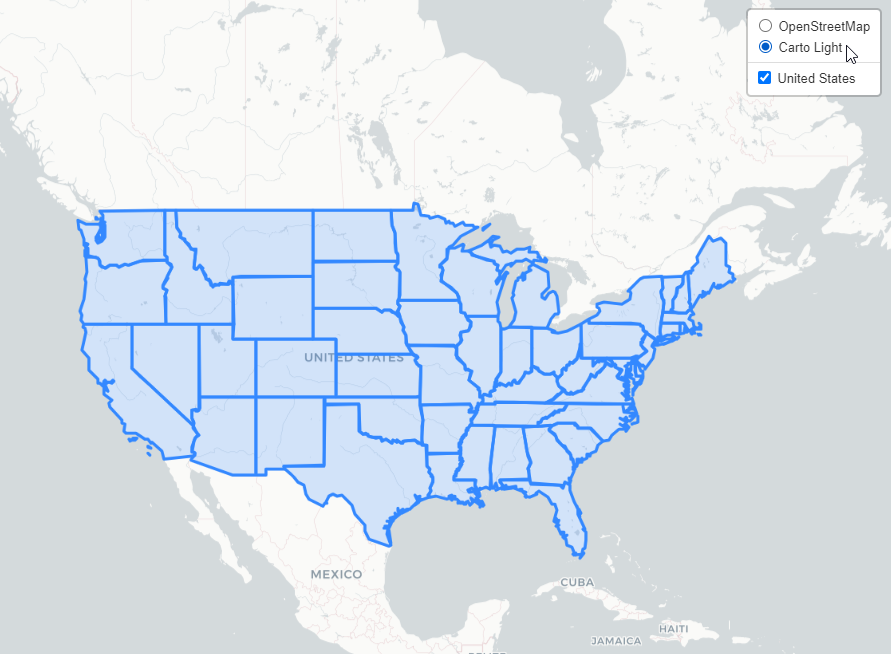
For example, let’s add a new Base Layer, “Carto Light.
First, add the layer to our html
var carto = new L.tileLayer('https://{s}.basemaps.cartocdn.com/light_all/{z}/{x}/{y}.png',{
attribution: '© <a href="http://carto.com">Carto</a> contributors'}).addTo(map);
Next, add the new ‘carto’ layer to baseMap as shown below.
var overlayMap = {
    "United States" :myLayer
};

var baseMap = {
    "OpenStreetMap" :osm,
     "Carto Light"  :carto
};
Our new html code now appears as below:
<!DOCTYPE html>
<html lang="en">
<head>
<base target="_top">
<meta charset="utf-8">
<meta name="viewport" content="width=device-width, initial-scale=1">
<title>Leaflet GeoJSON Example</title>
<!-- Leafletjs and CSS -->
<script src="https://unpkg.com/leaflet@1.9.4/dist/leaflet.js" integrity="sha256-20nQCchB9co0qIjJZRGuk2/Z9VM+kNiyxNV1lvTlZBo=" crossorigin=""></script>
<link rel="stylesheet" href="https://unpkg.com/leaflet@1.9.4/dist/leaflet.css" integrity="sha256-p4NxAoJBhIIN+hmNHrzRCf9tD/miZyoHS5obTRR9BMY=" crossorigin=""/>
<script src="https://code.jquery.com/jquery-3.7.1.js" integrity="sha256-eKhayi8LEQwp4NKxN+CfCh+3qOVUtJn3QNZ0TciWLP4=" crossorigin="anonymous"></script>
<!-- Inline map styling -->
<style>
html, body {
height: 100%;
margin: 0;
}
.leaflet-container {
height: 80%;
width: 80%;
max-width: 100%;
max-height: 100%;
}
</style>
</head>
<body>
<div id="map"></div>
<script>
var map = L.map('map').setView([47.7541, -107.05078], 3);
var osm = new L.tileLayer('https://{s}.tile.osm.org/{z}/{x}/{y}.png',{
attribution: '© <a href="http://osm.org/copyright">OpenStreetMap</a> contributors'}).addTo(map);
var carto = new L.tileLayer('https://{s}.basemaps.cartocdn.com/light_all/{z}/{x}/{y}.png',{
attribution: '© <a href="http://carto.com">Carto</a> contributors'}).addTo(map);
var url = 'states.json'; // GeoJSON data source. Can be file or GeoServer url.
//Loop through JSON file for features information -->
function forEachFeature(feature, layer) {
// Print all feature information
var mypopupContent = '<pre>'+JSON.stringify(feature.properties,null,' ').replace(/[\{\}"]/g,'')+'</pre>';
// above Bind to popup content
layer.bindPopup(mypopupContent);
}
// Null var that will hold layer
var myLayer = L.geoJson(null, {onEachFeature: forEachFeature});
// Add mylayer above to map
$.getJSON(url, function(data) {
myLayer.addData(data);
});
myLayer.addTo(map);
var overlayMap = {
"United States" :myLayer
};
var baseMap = {
"OpenStreetMap" :osm,
"Carto Light" :carto
};
L.control.layers(baseMap, overlayMap).addTo(map);
</script>
</body>
</html>
Refresh the page and your selector should now appear as below: